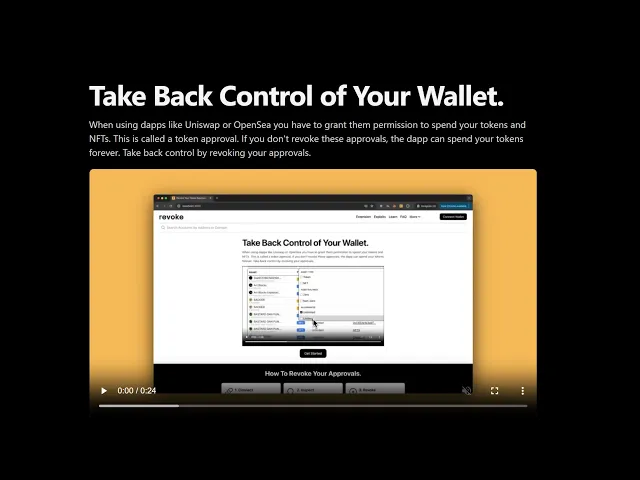

DeFi approvals risk is the exposure you create when you give a contract permission to move your tokens, not when you place a trade. The permission outlives the trade, often by years, and it keeps working whether or not you're paying attention. Most wallet drains described as hacks trace back to one of these standing permissions rather than to a stolen seed phrase.
Think about the last time you clicked approve. Maybe it was a stablecoin swap on a decentralised exchange, a deposit into a lending pool, or a claim page for an airdrop you half-remember. You probably accepted an unlimited allowance because the wallet suggested it, moved on, and never went back to look. That one click is likely still live.
What an approval grants, how the common types differ, and a routine you can run this week to find and tighten every permission you still hold.
Table of Contents
What a Token Approval Really Lets a Contract Do
Unlimited, Exact and Signed Approvals Compared
Reading the table row by row
How to Find, Revoke and Tighten Approvals This Week
The eight-step approval audit
What a clean list looks like
How Malicious and Compromised Contracts Drain Approved Tokens
Phishing Signatures and Permit Traps
Stale Permissions and Governance Changes Over Time
Checking Automated DeFi Tools Before You Grant Access
The token has an approval side too
Common Questions About Token Approvals
Does a hardware wallet stop approval drains
What if I already signed a permit I don't recognise
Can a protocol ask me to approve again after I revoke
What a Token Approval Really Lets a Contract Do
A token approval is a permission you give a smart contract to move tokens out of your wallet, and it stays active after the transaction that created it. A smart contract is code deployed at a blockchain address that runs whenever someone calls one of its functions. An approval tells the token contract that a specific address may move a set number of your tokens on your behalf.

The valet key comparison. You hand a valet the key so they can park the car once. They keep the key after the errand. Weeks later they can drive off again, and nothing alerts you until the car is gone. A token approval is that key: standing access, granted in a hurry, never returned.
On Ethereum and the chains that copy its token standard, the flow is two separate calls. ERC-20 is the standard that defines how a fungible token behaves, and it includes an approve function that sets an allowance, meaning the number of tokens a named address can spend from your balance. The application then calls transferFrom to move those tokens. The swap or deposit you watch on screen is the second call. The first call is the one that remains, and the spender, meaning the contract holding the permission, keeps its number until you change it.
Say you swap USDC once on a decentralised exchange, accept the unlimited option your wallet offers, and forget about it. Two years later that exchange's router is upgraded or its admin key is compromised. The new code still holds the allowance you granted, and it can pull your full balance, including the USDC you deposited last week.
A 2025 USENIX Security study of Ethereum approval exploits describes the same pathway from the attacker's side. An ERC-20 approval commonly lets a spender call transferFrom against the approved balance, so a later vulnerability or compromise in that contract converts a routine interaction into an asset drain. The study traces the main causes to attacker-controlled transfer parameters and weak authorization checks inside application logic.
That's the shape of it: the approval, not the swap, is the lasting exposure. A swap settles in seconds. An allowance waits for the next person who can call it.
Quick self-test: open the approval list for the chain you use most. If you find a permission you don't remember granting, you're holding a standing credit line you never sized.
Unlimited, Exact and Signed Approvals Compared
Not every approval carries the same weight, and wallets don't explain the difference when they present the prompt. The table below compares the forms you'll meet and what each one leaves behind.
Approval type | What the spender can do | Typical exposure | Risk level | Action |
|---|---|---|---|---|
Unlimited ERC-20 approval | Move any amount of that token up to the maximum value | Entire token balance, including future deposits | High if the spender is later compromised | Revoke after the position closes or replace with an exact amount |
Exact-amount ERC-20 approval | Move only the approved amount | Only the amount you approved | Lower, but still a standing permission until used or revoked | Keep while the action is active, revoke once spent |
Permit (signed off-chain approval) | Gain approval through a signature without a separate on-chain approve step | Amount and deadline stated in the signature | High if phished, because the signature is easy to overlook | Read the signed message, check the deadline and never sign unexpected prompts |
NFT operator approval (setApprovalForAll) | Transfer every item in the collection you hold | Whole collection | High, because it covers all tokens in the collection | Revoke when the marketplace or staking use ends |
Router or aggregator approval | Execute swaps on your behalf | Approved amount, often unlimited | Medium to high, depending on whether the contract can be upgraded | Use exact amounts or revoke after the swap |
Reading the table row by row
An unlimited ERC-20 approval is what most wallets pre-select. It covers your current balance and anything you deposit into that wallet later, so a compromise scales with every future top-up rather than with the trade you had in mind.
An exact-amount approval caps the damage at the number you signed. It's still a permission sitting on-chain, but if the spender turns hostile it can only take what you allowed.
Default rule: approve the exact amount for a one-off action, and treat any unlimited approval to a contract you no longer use as a revoke candidate.
A permit is where people get caught, because nothing visible happens at signing time. The permission arrives as a message rather than a transaction, carrying an amount and a deadline, and the attacker can submit it whenever they like until the deadline passes.
NFT operator approvals work at collection level. One signature lets the operator move every token you hold in that collection, including pieces you buy next month. Router and aggregator approvals are the most common place to meet an unlimited request, since swap contracts route through many pools and would otherwise need constant re-approval.
Risk level turns on capability more than on size. A contract whose owner can replace its code, or that sits behind an upgradeable proxy, meaning a contract that forwards calls to a second contract whose logic can be swapped out, can widen a modest allowance without asking you again. Keep the approvals your live positions depend on. Revoke everything else.
How to Find, Revoke and Tighten Approvals This Week
Approvals are stored per chain, so an allowance you signed on Base will never appear in an Ethereum explorer. This routine takes one sitting per chain and leaves you with a short list you can defend.

The eight-step approval audit
Open the approval list for the chain you used. Use your wallet's token approvals page or the approvals tab in a block explorer, and check each chain separately. If you're unsure where the list lives in your wallet, this walkthrough of the MetaMask approval view shows where the entries sit and what each column means.
Read every line, not just the ones you recognise. For each entry, note the token, the spender address, the allowance amount and the last-updated date if your tool shows it.
Label each entry active, finished or unknown. Active means a position still depends on it. Finished means the position closed. Unknown means you can't place it, which is the group that deserves attention.
Verify unknown spenders against official documentation. Look up the spender address on the protocol's own docs before you touch anything. Fake "revoke" sites exist, and their trick is to collect a fresh approval from people trying to clean up.
Revoke the ones you don't need by setting the allowance to zero. This costs a network fee that moves with congestion, and it returns no tokens, because revocation only removes permission, not balance.
Check what depends on an approval before revoking it. A lending position or vault strategy can stop working if the contract can no longer pull funds on its schedule. Close the position first, then revoke.
Replace unlimited allowances with exact amounts where the protocol allows it. Record the date, the spender and the amount for each approval you keep, so the next review takes minutes instead of an afternoon.
Repeat on every chain, then keep the short list. Finish with a note of what you kept and why.
If you'd rather watch the process before you start clicking, this walkthrough covers the same steps in the wallet.
What a clean list looks like
A clean list is short. It holds the approvals your live positions need, each with a named spender you verified, each sized to the job rather than to the maximum. Anything unlimited, unused, or tied to a protocol you stopped using is gone.
Practical rule: if you can't say who the spender is and why it needs the number it has, set the allowance to zero.
Isolation does much of this work for you. The Yield Agent limits what can go wrong with isolated wallets, approved vaults only and an emergency stop, and YieldSeeker is non-custodial, so only you and your AI agent can move and withdraw your funds. Crypto carries risk, and you can lose money even with careful setup.
How Malicious and Compromised Contracts Drain Approved Tokens
An approval works like a standing credit line. The swap ends, but the permission can remain open. Picture a lending router with a published interface and a long-lived unlimited USDC allowance. Its admin key sits with a small team. A team member gets phished, or an insider pushes a quiet upgrade. The new logic calls transferFrom on every wallet that ever approved the earlier version. Nothing appears on your screen, no alert arrives, and the transfer is valid because your permission was valid.
Three contract-side sources produce this outcome repeatedly: compromised admin keys, upgradeable proxies whose logic changes after your approval, and cloned contracts that copy a known router's interface at a different address.
The code path itself is where most losses start. In 2025, 89% of DeFi protocol losses came from protocol-logic exploits, according to Immunefi's six-year review of DeFi loss data. That classification points at how a contract's own logic handles a call, not at peripheral tooling around it. A normal looking frontend can hide a contract path that behaves very differently once funds arrive.
Bridge and infrastructure dependencies create another layer of exposure. Chainalysis reported on hacking losses in DeFi, and cross-chain bridges have been a major source of theft. An approval that ultimately routes funds through a bridge carries risk you cannot see in the approval prompt. The prompt shows a token, an amount and a spender. It does not show every contract the spender may call later.
Before you approve anything, run a short checklist:
Verified source code. The contract's code should be published and match the address your wallet shows.
A named upgrade admin. Find out who can change the logic, and whether that's a multisig, a single key or an anonymous deployer.
A timelock on changes. Code changes that execute instantly give you no window to react.
A stated audit scope. Read which contracts and which versions were reviewed, because an audit badge on a frontend often covers none of what you're about to approve.
A good set of DeFi vault security checks goes further and asks how a failing position is contained. It also asks whether the vault design limits what a bad actor can reach after a key or upgrade goes wrong. Reading how vault hacks actually play out helps clarify that distinction. Audits reduce identifiable defects. They do not remove admin-key authority or upgrade risk.
Limit the allowance, not only the choice of protocol. The protocol can be reputable and the permission can still be too large.
Phishing Signatures and Permit Traps
Audit badges describe the protocol. They say nothing about the domain you landed on, the frontend build it served, or the message your wallet asked you to sign. A claim page for an airdrop you never expected is the classic setup: it asks you to "verify eligibility", your wallet shows a text prompt rather than a transfer, and you sign. Weeks later the attacker submits the permit and moves the tokens.
This is why "check the transaction and trust the audit" is incomplete advice. A 2025 security summary cited by Alchemy's review of DeFi wallet security strategies reported that 80.5% of DeFi losses came from off-chain attacks rather than smart-contract exploits. That figure and the protocol-logic share come from different datasets with different classifications, so they aren't slices of one total and shouldn't be added together. Read them as two lenses: one on the signing perimeter, one on contract behaviour.

Five checks cover almost every signature request you'll meet:
Confirm the domain against the official site you opened yourself. Typo domains and lookalike subdomains are the standard delivery method.
Read the spender and the amount inside the message. Permit messages state both, and a number larger than the action needs is the tell.
Check the deadline. A long deadline, or a missing one, keeps the permit usable long after you've forgotten it.
Simulate where your wallet supports it. A simulation shows the balance changes a signature would authorise before you commit.
Refuse anything you didn't start. No legitimate claim, refund or migration needs a signature you weren't already expecting.
Automation cuts both ways here. A tool that signs on your instructions removes the rushed, tired click that phishing depends on, and it can watch allowances continuously in a way people don't. It can also amplify a bad permission if strategy limits and alerting are set loosely. The baseline habits for wallets, domains and signing requests are worth reviewing in these crypto security best practices.
Stale Permissions and Governance Changes Over Time
A token approval works like a standing credit line. You may use a lending market once, close the position, and move on, yet the allowance can remain pointed at that contract. Later, that contract may have new owners, new parameters, or a new implementation. Your wallet still treats the old permission as live access.
Governance is where that permission changes meaning without changing at all. A study of Compound and Uniswap governance analyzed more than 370 proposals and millions of on-chain events through August 2024 and found that as few as 3 to 5 voters could sway the majority of proposals. Low participation means a proposal can pass with little scrutiny from the people whose funds it affects. It can change collateral rules, oracle sources, or upgrade rights while your allowance sits untouched.
That is why approval hygiene is about time as well as trust. An audit badge tells you what was reviewed at a point in time. It does not make every future governance change harmless. The better question is simple. If this contract changes, how much can it still reach through permissions I forgot I gave?
Set a re-check schedule around events rather than memory:
After any governance vote or protocol announcement. Read what passed, not just the headline.
After you migrate to a new protocol. Revoke the old one in the same session.
At least once a month for approvals you keep. Date each entry so the review takes minutes.
On any pause, deprecation or migration notice. Treat it as a revoke instruction.
Across chains, keep the same list for each wallet and check it after every bridge, campaign, or strategy change. Signatures also deserve a date, especially permits with long deadlines. The goal is not predicting which protocol will change its rules. It is keeping the permission list short enough that a change cannot reach much. More on scoring this kind of counterparty sits in this guide to contract risk management.
Checking Automated DeFi Tools Before You Grant Access
Automation changes the approval question rather than removing it. A tool that moves funds on your behalf needs the same scrutiny as a manual protocol, plus a few questions about how it contains a failure. Treat each approval like a standing credit line that stays open after the swap, then check who can spend, how much, and for how long.
Before granting access, ask five practical questions:
How are funds isolated? Separate wallets or vaults per strategy limit what one compromised position can reach. In YieldSeeker's case, the Yield Agent uses isolated wallets, approved vaults only and an emergency stop, with funds kept in isolated accounts secured by Coinbase TEE (Trusted Execution Environment).
Which contracts will it approve? Expect a short list of named, verified vaults rather than open-ended spender access. YieldSeeker's AI agent analyzes trusted DeFi protocols and automatically manages capital to pursue sustainable yield, depositing USDC and spreading it across approved lending vaults on Base.
Who can move funds, and is there an emergency stop? The answer should be you, and an agent acting on your instructions. YieldSeeker is non-custodial, and only you and your AI agent can move and withdraw your funds.
Does it use exact amounts and revoke after closing? An allowance left at unlimited after a position ends is dead weight with live risk. YieldSeeker moves funds only when it's worth it, so the approval question still deserves a careful look before you connect.
Do alerts for unusual transfers or allowance changes reach you? Monitoring you never see isn't monitoring. A dashboard and activity feed make that review practical, and you can also discuss investments with your AI agent through plain-English agent instructions.
Plain-language controls reduce setup mistakes because you can state limits in words instead of hunting for settings. They don't remove contract, market or oracle risk. For the wider idea of agent-led DeFi, see how AI agents fit into DeFi workflows. Check current features and terms before relying on any of it.
The token has an approval side too
Don't stop at the tool. If it holds USDC, the issuer's standing matters as well, and the Bank for International Settlements' review of stablecoin regulatory responses notes that many jurisdictions authorise issuance only by banks, specified non-bank financial institutions, or entities holding a crypto-specific licence, and commonly require segregated reserves equal to tokens in circulation plus a right to redeem at 1:1 on demand. Redemption speed is part of that promise: Federal Register materials on the U.S. stablecoin framework describe a redemption policy under which timely redemption may not exceed two business days after a request.
No tool guarantees safety. Yields vary and are never guaranteed, crypto carries risk and funds can be lost, and none of this is financial advice.
Common Questions About Token Approvals
Does a hardware wallet stop approval drains
No. A hardware wallet protects your keys, and the approval is still signed by you. The protection depends on what you read on the device screen before you confirm, which is why the spender address and the amount matter more than the badge on the box.
What if I already signed a permit I don't recognise
Revoke any allowance you can see on that chain, and stop signing on that site. Be clear about the limit: a revoke removes future access, and it cannot reverse a transfer that has already executed. If funds moved, treat the wallet as exposed and move remaining assets to a fresh one.
Can a protocol ask me to approve again after I revoke
Yes. Starting a new position usually means a fresh approval request, and each one deserves the same sizing decision as the first. An exact amount for the action in front of you, reviewed before you click, is the habit that keeps the list short.
Approvals are the part of DeFi that keeps working after you've logged off, so the useful habit is a short permission list you can explain line by line. YieldSeeker is built around that idea: you deposit USDC on Base, and our AI agent spreads it across curated, audited lending vaults using isolated wallets, approved vaults only and an emergency stop, with no lockups on your funds. We charge 10% of the yield earned and never on deposits, and you keep control because the platform is non-custodial and only you and your agent can move or withdraw funds. Visit YieldSeeker to see how the agent works and to check the audits before you grant anything.